Website Builder: In an era where the online world dominates, having a well-crafted website has become a necessity for businesses and individuals alike. Website Builder offers an accessible and efficient way to create a professional site without the need for technical expertise or extensive time commitments. The platform is designed with the user in mind, ensuring that even those with no prior experience can quickly produce an impressive website that aligns with their vision.
Website Builder provides a seamless experience by combining intuitive design tools with industry-specific templates. These templates serve as a foundation, giving users a head start in crafting a site that not only looks polished but also caters to the unique demands of their field. The focus on simplicity and user-friendliness means that the process feels manageable, regardless of the scope of your project.
What sets Website Builder apart is its flexibility. While the templates provide structure, the platform allows for extensive personalisation, empowering users to shape their websites to fit their brand identity. From visuals to layout, each element can be adjusted to reflect your style, creating a digital presence that feels uniquely yours.
Getting Started
Starting your website journey with Website Builder is a simple and stress-free process. To begin, create your account by following a straightforward registration process that requires only a few details. Once you’ve signed up, you’ll gain immediate access to a wide array of design templates suited for different industries and purposes.
The platform categorises templates by sector, helping you to efficiently find one that matches the goals and identity of your project. Each template is thoughtfully designed, giving you a strong starting point to develop a site that fits seamlessly with your vision. Browse through the available options, and consider how each might work for your specific requirements. You’ll find designs that cater to everything from professional businesses to personal portfolios, ensuring flexibility no matter your needs.
After choosing the template that resonates most with your style, you can begin the customisation process. This is where the tools provided by Website Builder really shine, offering you the ability to tailor the template to better suit your branding and content. You don’t need to have prior experience in web design, as the interface is intuitive and guides you every step of the way. From uploading your own images to editing text, the tools available are designed to make the process enjoyable and straightforward.
As you start personalising your website, keep in mind the overall message you wish to convey. A cohesive look and feel can have a big impact on how your site is perceived by visitors, so take time to experiment with the colours, fonts, and layout provided. Remember, the choices you make during this stage will help shape the identity of your online presence.
Design Templates for Every Industry
Website Builder offers an impressive selection of design templates that cater to a wide array of professional fields and personal pursuits. Each template is developed with attention to detail, ensuring it incorporates design elements and features relevant to specific industries. This thoughtful approach means that whether you are looking to establish an online shop, showcase a creative portfolio, or promote a hospitality business, there is a design suited to your goals.
What truly distinguishes these templates is the balance between aesthetic appeal and functionality. Every design is created to not only look polished but also serve its intended purpose effectively. For instance, templates for retail businesses may include features like product grids and call-to-action buttons, while those for creative professionals often emphasise imagery and bold layouts to spotlight their work. This industry-specific tailoring ensures that the templates are as practical as they are visually compelling.
Navigating the available options is straightforward, as they are organised into clear categories based on sectors and use cases. This organisation streamlines the process of finding a template that aligns with your requirements, helping you avoid the overwhelm that often comes with too many choices. Additionally, the previews available allow you to visualise how each template might work with your branding and content, giving you confidence in your selection before you even begin customising.
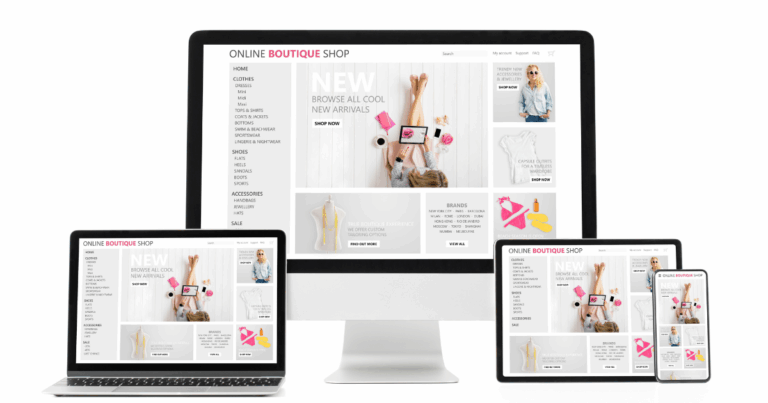
A standout feature of these templates is their adaptability. While they provide a strong foundation, they are not rigid designs. Instead, they act as starting points that can be adjusted to suit individual tastes and brand identities. This means you have the freedom to experiment with layouts, colours, and features, ensuring the final result is as distinctive as your project demands. Moreover, the templates are fully responsive, meaning they are designed to look great across all devices, from desktops to smartphones, which is crucial in today’s mobile-first world.
Another noteworthy aspect of the templates is their compatibility with various content types. Whether your website will primarily feature text, images, videos, or a combination of all three, the designs are flexible enough to accommodate these elements seamlessly. This adaptability ensures that your content takes centre stage, enhancing the overall impact of your site.
Ultimately, these templates serve as an excellent launchpad for creating a website that feels professional, functional, and unique to your vision. Their industry-specific nature, coupled with the ability to customise extensively, ensures you have the tools you need to build a site that not only meets but exceeds expectations.
Customisation Options
Website Builder provides users with an array of customisation tools that allow for precise control over the look and feel of their website. Once you’ve selected a template, the platform offers an intuitive interface where every element can be tailored to suit your specific needs. This includes the ability to modify layouts, rearrange sections, and integrate your preferred branding elements. The platform’s drag-and-drop functionality simplifies the process of making changes, ensuring that even users with no prior experience can confidently refine their website to align with their creative vision.
One key aspect of the customisation options is the flexibility it offers in visual design. The platform allows users to experiment with different colour palettes, giving you the chance to align the website’s appearance with your brand identity or personal preferences. This extends to typography as well, where a wide variety of font styles are available to choose from, enabling you to maintain a consistent tone throughout your site. These tools make it easy to strike a balance between aesthetics and functionality, creating a site that feels polished and cohesive.
Adding media content is equally straightforward, as the platform supports a variety of file types, from high-quality images to embedded videos. Whether you’re showcasing products, presenting a portfolio, or creating a blog, you can effortlessly incorporate visuals that enhance the overall appeal of your website. The ability to position and resize these elements ensures they integrate seamlessly into your chosen layout. Users can also incorporate galleries or sliders to present multiple images in a dynamic, engaging manner.
The platform also allows you to introduce interactive components to your site. From embedding forms and contact details to integrating social media links, the tools provided ensure that your website remains engaging and user-friendly. These features not only improve visitor experience but also contribute to achieving your goals, whether that’s increasing client interactions or growing your online presence.
Customisation extends beyond visuals, as Website Builder supports modifications to the structure and functionality of your site. For example, users can include custom navigation menus to improve accessibility, ensuring visitors can easily find what they’re looking for. Additionally, features such as call-to-action buttons and subscription forms can be strategically placed to encourage engagement and conversions.
For those looking to integrate branding into their website, the customisation tools enable the addition of logos, taglines, and branded imagery. This ensures that every aspect of your site consistently reflects your identity, making a strong impression on visitors. Furthermore, the option to upload bespoke content means you can make your website a true reflection of your vision without any limitations.
Another notable feature of the platform is the ability to preview changes in real-time. As you make adjustments, you can immediately see how they will look on the published version of your site, helping you make more informed design decisions. This ensures that every detail is attended to, creating a polished final result.
Website Builder also recognises the importance of mobile optimisation, and its customisation tools are designed to accommodate this need. Any changes you make are automatically optimised for various screen sizes, ensuring that your site looks professional on desktops, tablets, and smartphones alike. This approach to responsive design enhances user experience and ensures your site remains accessible to a wide audience.
Additionally, for those who may wish to integrate advanced functionalities, the platform supports external plug-ins and extensions. This opens the door to features such as e-commerce tools, analytics tracking, or multilingual support, allowing your site to grow alongside your needs.
Time-Saving Features
Website Builder is packed with tools designed to help you complete your site quickly without compromising on quality. One of the most valuable features is its collection of ready-made design elements that can be easily incorporated into your website. These include pre-designed sections for contact forms, image galleries, and testimonials, allowing you to save time on creating these components from the ground up. The platform’s efficient drag-and-drop functionality ensures you can rearrange and modify these elements with ease, cutting down the time spent on formatting or technical adjustments.
In addition to the pre-built sections, the platform’s library of pre-set design templates provides users with a solid starting point. These templates are tailored to meet the needs of various industries, meaning you can bypass the lengthy process of designing layouts entirely. Once you’ve selected the one that suits your project, you can focus on refining the details to better reflect your vision. Because the templates are thoughtfully organised by category, you can locate a design that aligns with your goals in just a few minutes.
Another key time-saving feature is the ability to preview edits in real time. Instead of repeatedly switching between editing and preview modes, you can see the impact of your changes as you make them. This functionality reduces back-and-forth adjustments, streamlining the entire design process and allowing you to make confident decisions quickly. Whether you’re experimenting with different fonts, colours, or layouts, this feature ensures you maintain an efficient workflow.
To further enhance efficiency, Website Builder supports bulk uploads for media content, enabling you to add multiple images or files to your site at once. This is particularly useful for those managing larger projects, such as online stores or extensive portfolios, as it reduces the time spent uploading and organising files individually. Once your content is added, the platform automatically optimises it for web use, saving you the effort of manual resizing or compression.
The platform also includes shortcuts for adding functionality, such as integrating social media links, call-to-action buttons, or subscription forms. These features can be implemented in just a few clicks, helping you build an interactive and user-friendly site without the need for additional technical know-how. Similarly, embedding third-party services, like maps or videos, is a simple process, cutting down the time required to add these interactive elements to your pages.
Another standout feature is the ability to clone or duplicate elements within your site. If you’ve spent time perfecting a particular section, you can easily replicate it elsewhere without having to rebuild it from scratch. This is particularly useful for maintaining consistency across multiple pages, ensuring your site remains cohesive while saving valuable time.
For users managing ongoing projects, the auto-save function provides peace of mind by ensuring your work is continually backed up. This eliminates the risk of losing progress due to unexpected interruptions, allowing you to focus entirely on the task at hand. Additionally, automated updates to templates and design elements mean you don’t need to spend time searching for the latest features or design trends – the platform ensures you always have access to the most up-to-date tools.
Lastly, the user-friendly interface itself is designed to minimise the learning curve, ensuring you can get started right away without investing excessive time in understanding how the platform works. Clear instructions, tooltips, and guided steps are integrated throughout the process, helping you navigate each stage efficiently and focus on what matters most: creating a website that suits your needs.
Publishing Your Website
Once the customisation of your website is complete, the next step involves preparing it for publication. This process begins with thoroughly reviewing every element to ensure your website is not only visually appealing but also functions seamlessly. Carefully go through your site, paying attention to details such as navigation menus, interactive features, and the layout on both desktop and mobile devices. Any discrepancies or areas requiring improvement should be addressed at this stage to ensure a professional and user-friendly experience.
Before making your website accessible to the public, it’s essential to test all interactive components. Features like forms, buttons, and links should be checked to confirm they are working correctly and directing users to the intended destinations. This includes ensuring that any external links open properly and embedded elements, such as videos or maps, display as expected. Verifying these functions will ensure a smoother experience for visitors and reduce the likelihood of encountering issues post-launch.
Additionally, it’s advisable to review the loading speed of your site. Slow loading times can negatively affect user experience, so optimising your images, videos, and other media files is important. Website Builder already assists with automatic optimisation, but it’s worth confirming that all pages load efficiently. Fast performance is crucial for retaining visitor engagement and can also positively influence search engine rankings.
Reviewing your content is another critical step. Ensure that all text is proofread to eliminate spelling or grammatical errors, as these can detract from your site’s credibility. Double-check contact details, pricing information, or any other key pieces of data for accuracy. This is particularly important for businesses or professionals aiming to establish trust with their audience. If your website includes downloadable files, such as brochures or catalogues, verify that they are updated and accessible.
For those using custom domain names, this is the point at which you should link your chosen domain to your website. Website Builder offers clear guidance for connecting a domain, ensuring it is a straightforward process. A personalised domain not only enhances professionalism but also makes your website easier for visitors to find and remember.
It’s also worth considering the use of analytics tools prior to publishing. These can be integrated to track visitor behaviour and provide insights into how your website is performing. By setting up these tools in advance, you can begin gathering data from the moment your site goes live, helping you to make informed decisions about future updates or improvements.
Lastly, preview your entire site one final time using Website Builder’s built-in preview function. This allows you to see exactly how your site will appear once published, ensuring that all elements are displayed correctly. Adjustments can be made directly if anything appears out of place, avoiding potential issues after the site is live. Once you are confident everything meets your expectations, the platform’s streamlined process allows you to publish your website in just a few clicks, making it available to your intended audience.
Support and Resources
Website Builder goes beyond helping you create your website by offering a range of tools and services to ensure you can effectively manage and improve your online presence. Whether you’re seeking to enhance your website’s features or address challenges that arise, the platform is equipped with the necessary resources to support you at every stage.
One of the most valuable offerings is the extensive library of guides and tutorials available directly within the platform. These resources are tailored to assist users of all skill levels, providing clear, step-by-step instructions on a variety of topics. Whether you’re exploring advanced customisation techniques or integrating additional functionalities, these guides ensure you can confidently navigate the process without requiring external help.
For users seeking personalised assistance, Website Builder’s customer support team is readily available. You can reach out via multiple channels, such as live chat or email, to receive timely and effective solutions to your queries. The support team is well-trained to handle a variety of issues, from troubleshooting technical glitches to providing advice on best practices for optimising your site. This ensures that help is always within reach when you need it.
To help you keep your website up to date and competitive, Website Builder also offers access to a range of additional tools and features. These include plug-ins and integrations designed to expand the functionality of your site, such as e-commerce capabilities, analytics tools, or third-party service connections. By making these tools accessible, the platform empowers you to adapt your website to meet your evolving goals and audience expectations.
Another notable feature is the platform’s commitment to keeping users informed about updates and improvements. Regular notifications ensure that you are aware of the latest features, design trends, or technical enhancements, allowing you to take full advantage of everything the platform has to offer. This proactive approach helps you maintain a modern and effective website without the need for extensive research or additional costs.
In addition to technical support and features, Website Builder places a strong emphasis on education, providing insights into topics such as search engine optimisation (SEO), content strategy, and website performance. These resources are designed to help you not only manage your website but also grow your online presence effectively. By learning how to improve your site’s visibility and engagement, you can make informed decisions that benefit your long-term goals.
For those managing more complex websites, Website Builder also offers advanced support options, such as consultations with specialists or tailored advice on scaling your site. These services are ideal for users looking to optimise larger projects or implement bespoke solutions, ensuring that even the most ambitious goals can be achieved.
To ensure you can easily find the help or resources you need, the platform’s interface includes a dedicated support section, where all tutorials, guides, and customer service options are conveniently organised. This streamlined approach means you can quickly access the information or assistance required, saving time and reducing frustration.
With these comprehensive support services and resources, Website Builder provides the tools necessary to maintain a successful and dynamic website, empowering you to confidently manage your online presence.
Ready to grow online?
Build your website, register your domain, secure your hosting and manage your online presence with Trodomains.
Visit Trodomains